Generic
FDM Enclosure with Vent Kit
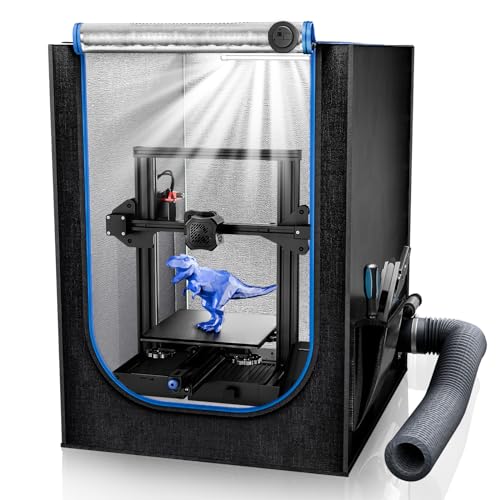
A vented FDM enclosure is the right upgrade when failures map to room conditions: drafts, cold garage air, odor, or humidity swings. It is not a universal enclosure recommendation, but for a workshop that changes by season, it gives the printer a controlled local climate.
Street check
$119
Decision snapshot
What this product actually solves
Print Climate reviews gear by the missing condition: drying, storage, enclosure control, resin boundaries, or abrasive hardware readiness.
8.0
fit score
Buy it for
- Combines draft control, basic temperature stability, humidity visibility, and exhaust-routing planning into one bench surface.
- Most useful in garages, basements, and rooms where HVAC swings cause intermittent print failures.
- A vent path is a better starting point than trapping every odor and particle inside a fabric box.
Check first
- Generic enclosure sizing must be checked carefully against printer dimensions, spool placement, and bed travel.
- Vent kits need a real exit path; a fan that recirculates into the same room is not the same thing.
- Can raise electronics temperature if the printer is not designed for enclosed use.
At a Glance
Best For
Fit check
Before this belongs in the cart
The right purchase should remove one specific workshop constraint. Use these checks before clicking through to Amazon.
Confirm
- The printer manufacturer allows or tolerates enclosure use for your model.
- The enclosure fits full bed travel, gantry motion, spool path, and maintenance access.
- The target material benefits from draft control or exhaust routing.
- The vent path has a real destination instead of recirculating into the same room.
Pair with
- Dry boxes or a dryer if the real problem is wet PETG or TPU.
- A room hygrometer near the printer so seasonal swings are visible.
- Material-specific enclosure habits, open for PLA when cooling matters, closed for draft-sensitive jobs.
Skip if
- You are trying to solve moisture without drying or sealed storage.
- The printer is a Bambu A1 or A1 Mini and manufacturer guidance says not to enclose it.
- The room has no responsible exhaust route for odor-producing materials.
Bench note
Overview
An FDM printer enclosure with a vent kit and hygrometer is a room-control product, not a universal upgrade. It belongs on Print Climate because garages, basements, drafts, seasonal humidity, ABS/ASA odors, and awkward spool paths can make a printer feel inconsistent even when the slicer profile is fine.
The right buyer is not every PLA user. The right buyer is someone who can name the room problem: drafts, warp, temperature swing, odor routing, or humidity visibility. If the enclosure has a job, it can help. If it is just a cover over a printer, it may trap heat, complicate access, or hide the actual failure.
Print Climate should present this product as a planning boundary: measure the printer, measure lid and bed travel, plan filament feed, decide where the air goes, and keep a hygrometer near the machine.
The conversion promise is a controlled local climate. A buyer in a basement does not need another generic upgrade list; they need to know whether the printer's immediate air is stable enough for the material. This enclosure earns the click when it turns that room problem into a measurable, adjustable workstation.
Pros & Cons
Pros
- Combines draft control, basic temperature stability, humidity visibility, and exhaust-routing planning into one bench surface.
- Most useful in garages, basements, and rooms where HVAC swings cause intermittent print failures.
- A vent path is a better starting point than trapping every odor and particle inside a fabric box.
- Good fit for printers and materials that actually benefit from enclosure use; not a default Bambu A1/A1 Mini recommendation.
Cons
- Generic enclosure sizing must be checked carefully against printer dimensions, spool placement, and bed travel.
- Vent kits need a real exit path; a fan that recirculates into the same room is not the same thing.
- Can raise electronics temperature if the printer is not designed for enclosed use.
Design & Build Quality
Most tent-style FDM enclosures use a fabric shell over a lightweight frame, with viewing panels, cable access, and some form of vent or fan path. The product is useful when it fits the printer with enough clearance for bed travel, toolhead motion, spool routing, and maintenance access.
Build quality should be judged by zipper durability, frame stability, seam quality, and how easy it is to open the enclosure without knocking the printer out of level. Buyers should not assume the advertised size is enough. Measure the printer in motion, not only the footprint.
The vent kit changes the physical inspection. The user needs room for duct bends, a fan path that does not block normal service, and cable exits that do not leave large uncontrolled gaps. A tent that fits the printer but forces the duct into a sharp kink is not really the right size.
A hygrometer is also a placement decision. If the display is hidden behind the printer or sits near a leak path, the reading may not describe the chamber the print actually sees. Put the sensor where it can be checked without opening the enclosure every time.
Performance & Specifications Deep Dive
The useful specs are enclosure dimensions, vent path, fan compatibility, hygrometer visibility, and material behavior. A stable warm chamber can help ABS/ASA and reduce draft-related warping. It can also hurt PLA if cooling suffers or electronics sit in unnecessary heat.
A hygrometer makes the local room visible. It does not dry filament by itself, but it can explain why the same PETG spool behaves differently in June than it did in February. Pairing the enclosure with sealed filament storage is often more important than buying a larger tent.
Ventilation must have a destination. A small fan that recirculates through a weak filter inside the same room is not the same as source control. If odor is part of the buying reason, the page should push the user to plan duct routing before checkout.
Performance also depends on printer design. Some machines keep electronics, power supplies, or spool holders in places that do not like extra heat. Before enclosing an open-frame printer, buyers should check manufacturer guidance, look at cable strain, and avoid turning a draft fix into an electronics heat problem.
The enclosure is most credible when the buyer can state the operating mode: open or vented for PLA, partially controlled for PETG, warmer and more draft-protected for ABS or ASA, and storage-aware for idle spools. One box cannot be optimal for every material without changing how it is used.
Software & User Experience
There is no software layer, but enclosure workflow affects every print. Users need to open doors for PLA when cooling matters, close the chamber for draft-sensitive materials, and watch whether internal heat affects electronics or filament path.
The best experience comes from treating the enclosure as a setup mode. PLA mode, PETG humidity mode, ABS/ASA draft-control mode, and storage mode may all look different. The product is a tool for changing the local environment, not a permanent sealed box for every job.
The buyer should set up a small routine before the first serious print: check the hygrometer, confirm the vent path, make sure the spool feeds cleanly, then decide whether the door should be open, cracked, or closed. That takes one minute and prevents the common mistake of enclosing the printer and hoping every material improves.
Good enclosure UX is boring access. If every nozzle wipe, filament swap, or bed clean requires dismantling the tent, the user will stop using it correctly. The enclosure should make good habits easier than bad ones.
Real-World Use Cases
The strongest use case is a garage or basement printer where ambient conditions change seasonally. Drafts, cold air, and humidity can create failures that look random. An enclosure can stabilize the immediate print zone while a hygrometer confirms what the room is doing.
It is also useful for ABS and ASA users who need draft reduction and some odor routing. That said, odor routing should be conservative: know where the air exits, avoid occupied spaces, and do not treat a small filter as a certified safety system.
The weak use case is a stable room printing mostly PLA. PLA often benefits from airflow, and unnecessary enclosure heat can create its own problems. Those users should buy dry storage before buying a tent.
Another strong use case is a shared workshop where the printer is near doors, HVAC vents, or tools that move air. The enclosure can protect the first layers and tall corners from sudden temperature changes. It also gives the user a place to mount a simple instrument panel: thermometer, hygrometer, and a small note about material mode.
It is not the right answer for Bambu A1/A1 Mini owners by default. Bambu's own guidance is cautious about enclosing that platform. If an A1 user has a draft problem, solve filament storage, room placement, and material choice first, then treat any enclosure decision as model-specific rather than generic advice.
Who Should Buy (And Who Shouldn't)
Buy this kind of enclosure if the printer lives in a drafty garage, basement, or shop, or if the material plan includes ABS/ASA and the user has a realistic air path. It is also useful for users who need a local hygrometer near the printer.
Skip it if the printer already lives in a stable conditioned room, if the user mostly prints PLA, or if the enclosure cannot be vented responsibly. A bad enclosure can create heat, access, and routing problems without solving the real issue.
The buyer should also skip it if the printer barely fits. Clearance is not a nice-to-have on bedslingers and tall gantry machines. If the bed, spool, cable chain, or top-mounted tube touches the enclosure during motion, the product can create failures that look like printer defects.
Alternatives Worth Considering
A sealed dry-box stack is a better first purchase when the main symptom is wet filament. The SUNLU S4 or SUNLU S2 handles active drying, while storage boxes protect partial rolls.
For resin, use a resin-specific enclosure and workflow plan instead. Resin source control, PPE, and waste handling are different from FDM draft control.
For users who only need temperature stability, a simpler enclosure without a vent kit may be enough. For users who care about odor routing, a known inline fan and window adapter can matter more than the tent brand. Print Climate should push the buyer to spend on the missing layer, not the most complete-looking box.
Our Verdict
A vented FDM enclosure is the right upgrade when failures map to room conditions: drafts, cold garage air, odor, or humidity swings. It is not a universal enclosure recommendation, but for a workshop that changes by season, it gives the printer a controlled local climate.
| Full Specifications | |
|---|---|
| Category | Enclosure |
| Role | Room condition control |
| Max Temp | 0C |
| Capacity | 1 printer |
| Active Heat | No |
| Active Airflow | Yes |
| Humidity Readout | Yes |
| Print Through | No |
| Ventilation | Yes |
| Resin Workflow | No |
| Abrasive Ready | No |
| Best Materials | ABS, ASA, PETG |
| Footprint | Printer enclosure |
Frequently Asked Questions
Should every FDM printer be enclosed?
Does a hygrometer dry filament?
Is a vent kit enough for ABS or ASA fumes?
What should I measure before buying?
What is the best first enclosure habit?
Is this a good default upgrade for a Bambu A1?
Can an enclosure cause new print problems?
Should the spool live inside the enclosure?
Related Buying Guides
Compare With Similar 3D Printer Environment Upgrades
Head-to-Head Comparisons
FDM 3D Printer Enclosure with Vent Kit and Hygrometer
$119
Prices may change - check current Amazon listing.